
 +1 (213) 715-5368
Vedanshi
2026-10-23
7 min read
Custom HubSpot Integrations: Benefits, Examples, and Best Practices
Your business uses HubSpot to manage customer relationships, but disconnected systems create data issues.
Read More
Published On:2025-12-25
Sending emails and hoping for the best isn’t a strategy. If you’re using HubSpot Sequences or thinking about getting started, you’re probably wondering how to turn those automated emails into actual conversations and conversions.
But the good news is that HubSpot Sequences can be incredibly powerful when used in the right way. And the bad news is that most people don’t know how to set them up properly, which means they’re leaving money on the table.
In this guide, we will walk you through nine strategies that actually work. Whether you’re just starting with HubSpot Onboarding or you’ve been using the platform for a while, these tactics will help you get better results from your email outreach.
HubSpot Sequences are automated email tools built into HubSpot’s Sales Hub. They let you send a series of personalized emails to prospects over time, without having to manually send each one. Think of them as your personal follow-up assistant that never forgets and never gets tired.
Here’s what makes them different from regular email campaigns:
If you’re working with HubSpot CRM Developers or considering HubSpot Services, sequences are one of those features that can seriously change how your sales team operates. The reality is that HubSpot marketing automation is only as good as the strategy behind it.
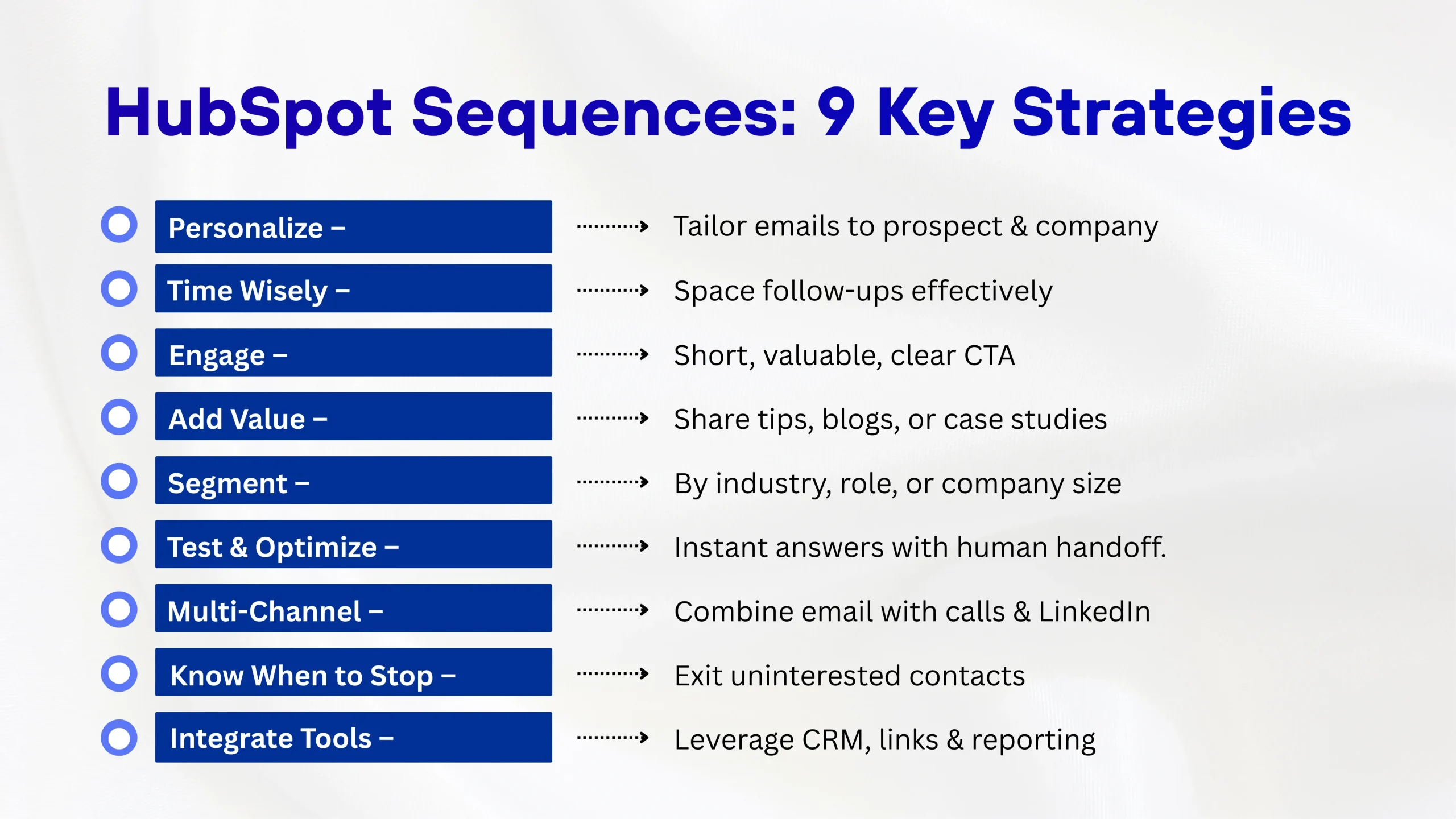
When we say personalization, we don’t just mean using someone’s first name in the subject line. That’s basic stuff that everyone does now.
Real personalization means doing your homework. Before you enroll someone in a sequence:
What are they working on? What challenges might they be facing? What recent news or achievements can you reference?
A CEO cares about different things than a marketing manager. Your email should reflect that.
Did you both attend the same university? Work in the same industry? These connections matter.
Here’s an example of what NOT to do:
“Hi [First Name], I noticed your company [Company Name] could benefit from our solution…”
And here’s better:
“Hi Sarah, I saw TechCorp just opened a new office in Austin. Congrats on the expansion! Growing that fast usually means your team is juggling a lot. I’ve helped companies in similar situations streamline their sales process during growth phases…”
See the difference? One sounds like a template. The other sounds like you actually care. When you’re working on HubSpot CRM Automation, this level of personalization becomes easier because you can pull in data from your CRM to make each email relevant.
Timing isn’t just about what day or hour you send an email. It’s about the spacing between emails and understanding your prospect’s journey.
Space them out intelligently. Here’s a framework that works:
You want to be persistent without being annoying. If someone hasn’t responded after four emails over three weeks, they’re probably not interested.
If you’re setting this up through HubSpot Onboarding, ensure that you test different timing patterns to see what works for your audience. B2B buyers check email differently from B2C consumers.
Nobody wakes up excited to read another sales email. So, how do you write ones that people actually engage with?
Your email should be scannable in under 30 seconds. If you need to scroll to see the whole thing, it’s too long.
What’s in it for them? Make this clear in the first sentence.
Don’t give them multiple choices or questions. One clear call to action is enough.
Read your email out loud. Would you actually talk like this to someone at a coffee shop? If not, rewrite it.
Here’s a template structure that works:
This approach works whether you’re doing outbound sales, following up with leads from HubSpot Website Development projects, or nurturing prospects through HubSpot Marketing Hub.
One of the best ways to stand out in someone’s inbox is to give before you ask. Instead of just pitching your product or service, share something useful:
For example, if you’re offering HubSpot CMS Development services, don’t just list your features. Share a quick video showing how a CMS migration improved someone’s website performance, or send them a checklist for evaluating their current setup.
The key is to make each touchpoint valuable. This is where HubSpot Automation Solutions really shine because you can trigger different content based on what actions people take.
Your conversion rates will be destroyed if you treat prospects as though they are all created equal. Before you even build a sequence, think about who you’re talking to:
A sequence for healthcare companies should be different from one for tech startups. The pain points are different, the language is different, and the solutions you highlight should be different.
Small businesses care about ROI and ease of implementation. Enterprise companies care about scalability and integration capabilities.
Create separate sequences for decision-makers versus end-users. A CFO needs different information from a marketing manager.
When working with HubSpot CRM Developers on your setup, make sure you’re building these segments into your CRM from the start. The cleaner your data, the better your sequences will perform.
Your first sequence isn’t going to be perfect. And that’s okay. The businesses that get the best results from HubSpot Sequences are the ones that treat them like experiments.
What should you test?
Try questions versus statements and personalization versus plain text.
Some audiences respond better to short emails; others want more detail.
Does “Can we hop on a quick call?” work better than “Would you be open to a conversation?”
Morning versus afternoon and weekdays versus weekends.
Maybe three emails work better than five for your audience.
The beauty of HubSpot CRM Migration is that all your data comes with you, so you can keep learning and improving your sequences based on real results.
Email is powerful, but it shouldn’t be your only weapon. The most effective sequences combine email with other forms of outreach.
After the second email, set a task to call the prospect. Sometimes a voice conversation breaks through where email can’t.
Include a task to connect on LinkedIn after your first email. This gives you another channel to stay on their radar.
Set reminders to like or comment on their LinkedIn posts. It’s a soft touch that keeps you visible.
When you’re working with a HubSpot Migration Partner, ask about integrating these multi-channel approaches into your overall strategy. The goal is to be present without being pushy.
Not every sequence needs to end with a sale. Sometimes, the best strategy is knowing when to change course.
If someone has opened your emails multiple times but hasn’t replied, they’re interested but not ready. Maybe they should move to a different sequence that nurtures them with helpful content instead of sales pitches.
If someone hasn’t opened any of your emails, your subject lines aren’t working. Don’t keep sending them the same type of content.
If someone replied but said “not interested,” respect that. Remove them from the sequence and move on.
When you’re working with HubSpot Services providers or setting up your system, make sure you build in these exit criteria, so your sequences are smart about when to continue and when to stop.
Sequences work best when they’re part of a bigger strategy, not operating in isolation.
Make sure every interaction is logged. If someone visits your pricing page after getting your second email, that’s valuable context for your next touchpoint.
Instead of the back-and-forth of scheduling, include a link to your calendar so interested prospects can book time immediately.
If you’re running HubSpot Website Development or creating resources through HubSpot CMS Development, make sure your sequences can reference and link to this content.
Use HubSpot Hubs reporting to understand which sequences are performing and which need work.
If you’re considering a HubSpot Migration Partner, ask them how they’ll help you integrate sequences into your overall strategy.
Reading strategies is one thing. Actually implementing them is another. Here are some practical tips to get started:
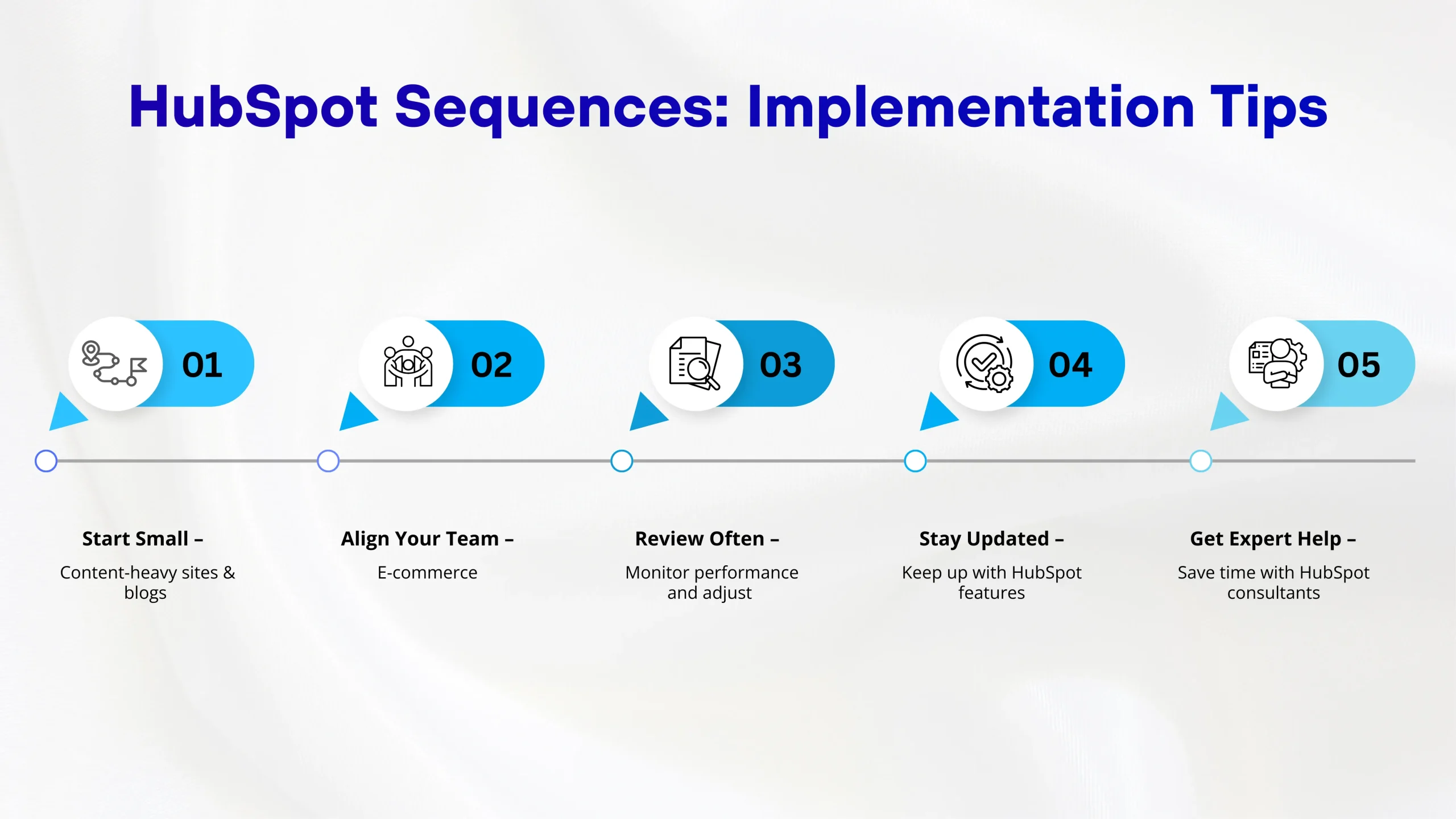
Don’t try to build ten different sequences on day one. Create one really good sequence, test it, and then expand.
If multiple people will be using sequences, make sure everyone understands the strategy and voice because consistency matters.
Set aside time each month to look at your sequence performance. What’s working? What’s not?
HubSpot regularly updates its features. Stay current with what’s new in HubSpot Automation Solutions and HubSpot Marketing Hub.
If you’re new to this, working with HubSpot Sales Consulting experts can save you months of trial and error. And if you’re moving from another platform, understanding HubSpot CMS migration services pricing upfront can help you budget properly for a smooth transition.
Even with good strategies, it’s easy to make mistakes that kill your conversion rates:
Nobody cares about all 47 features of your product. They care about solving their specific problem.
If every email sounds like a pitch, people will tune out.
Most people check emails on their phones. If your emails look terrible on mobile, you’re losing opportunities.
One email isn’t enough. Most deals require multiple touchpoints.
Different industries, roles, and company sizes need different approaches.
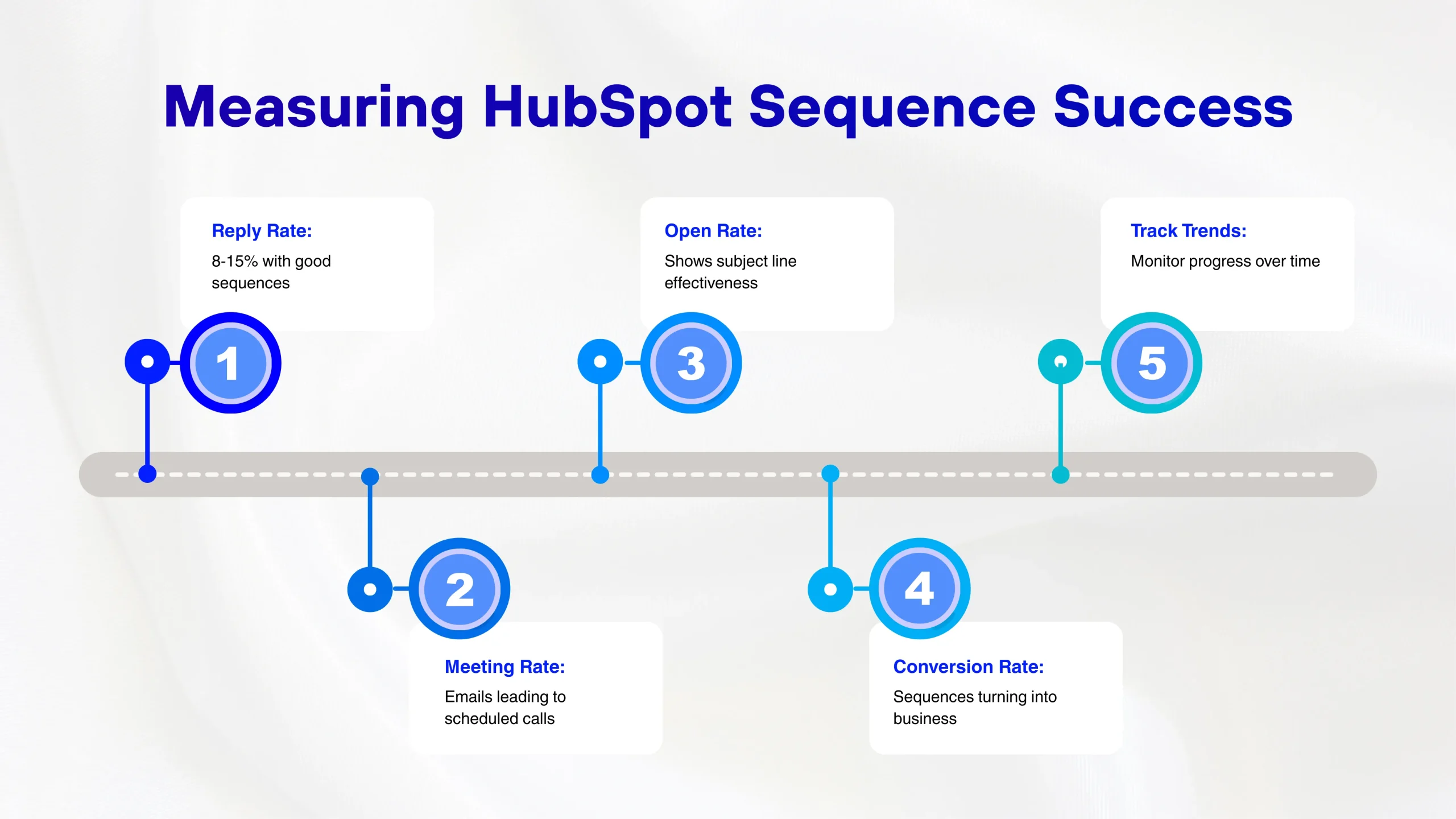
How do you know if your sequences are actually working? Look at these metrics:
What percentage of people respond to your emails? Industry average is around 1-3%, but with good sequences, you can hit 8-15%.
If your goal is to book meetings, track how many sequences lead to scheduled calls.
While not perfect, it gives you a sense of whether your subject lines are working.
At the end of the day, how many sequences turn into actual business?
Don’t just look at these numbers. Look at the trends over time. Are things getting better or worse? Why?
A proper setup from the start through HubSpot Onboarding services means your sequences align with your overall sales process and you’re using all the right features effectively. Whether you need help with the technical side through HubSpot CRM Migration or the strategic side through HubSpot Sales Consulting, getting expert guidance can dramatically accelerate your results.
Most effective sequences have 3-5 emails. You want enough touchpoints to be persistent but not so many that you become annoying. The key is quality over quantity. Three really good, valuable emails will outperform seven mediocre ones every time.
Sequences are specifically designed for one-to-one sales outreach, not mass marketing. For marketing campaigns to larger lists, you should use HubSpot’s marketing email tools instead. Sequences work best when your sales team is reaching out to specific prospects with personalized messages.
Sequences are for manual, personalized sales outreach and stop when someone replies. Workflows are for automated marketing processes and can handle more complex, branching logic. Sequences are typically used by sales teams, while workflows are used by marketing teams.
The cost varies widely depending on your needs. HubSpot Sequences come with the Sales Hub Professional and Enterprise tiers. Migration costs depend on factors like your current platform, data complexity, and whether you need custom development work. Many businesses budget between $3,000 and $15,000 for a complete HubSpot migration and setup, though HubSpot CMS migration services pricing can range higher for complex projects.
There’s no universal “best” time because it depends on your audience. B2B emails often perform well Tuesday through Thursday, between 8-10 AM or 1-3 PM in the recipient’s timezone. However, you should test at different times with your specific audience. The beauty of HubSpot is that you can easily track performance by send time and adjust accordingly.
Vedanshi
2026-10-23
7 min read
Your business uses HubSpot to manage customer relationships, but disconnected systems create data issues.
Read More
Vedanshi
2026-10-22
7 min read
Ask ChatGPT, Gemini, or Perplexity to recommend a supplier or a software tool, and you get a short list of names, not ten blue links.
Read More
Vedanshi
2026-10-21
7 min read
Building a website takes more than picking colors, dropping in images, and writing copy.
Read More