+1 (213) 715-5368

Bring your real estate operations into a more connected and efficient CRM environment.
 Leads and client
 Properties
 Sales and deal
 Viewings and
 Communication
 Marketing and
Real estate businesses manage more than contacts and deals. Buyers, sellers, agents, investors, properties, listings, viewings, offers, and transactions all have different relationships and data requirements.
A standard CRM structure may not always reflect how a real estate business operates. HubSpot CRM for real estate can be customized around your processes, allowing teams to organize property-related information and workflows in a way that fits their business.
Different relationships require different information. Create tailored contact records for buyers, sellers, agents, investors, tenants, and other audiences so teams can access the information relevant to each relationship.
Connect properties with owners, listings, interested buyers, agents, and related activities. Where supported by the HubSpot subscription and setup, custom objects can help organize property-specific records and relationships.
Real estate leads can come from websites, property portals, referrals, campaigns, social media, and other channels. Create a structured process for capturing, assigning, qualifying, and following up with leads.
Track offers, negotiations, transactions, and deal stages through defined pipelines. Give teams a clearer view of where each opportunity stands and what needs to happen next.
Connect viewing appointments with the relevant property and prospect. Teams can manage schedules, reminders, follow-ups, and viewing activity from connected records.
Organize buyer or tenant requirements such as location, property type, budget, bedrooms, investment preferences, and other criteria to support more relevant communication.
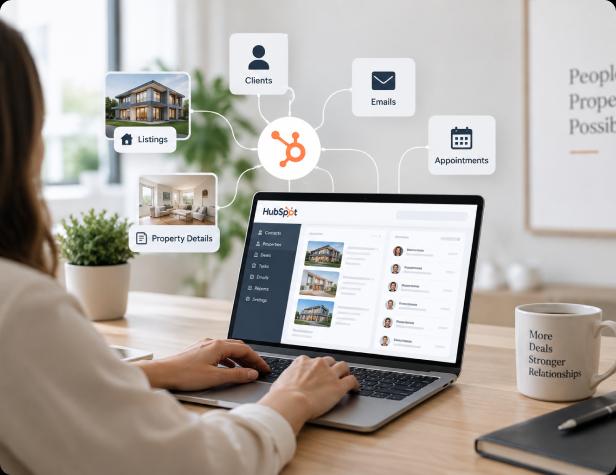
When client and property information is spread across spreadsheets, listing platforms, email inboxes, websites, and other systems, teams can struggle to see the full context behind each interaction. HubSpot for real estate brings relevant client, property, deal, and engagement information into a shared CRM environment, helping teams connect prospects with properties, track interactions and preferences, manage offers, and keep communication history organized. This real estate CRM solution gives sales, marketing, and real estate teams a clearer view of each relationship, from the first inquiry through viewing, offer, transaction, and ongoing client engagement.
Managing multiple properties can become difficult when listing details, availability, pricing, buyer interest, and property activity are maintained across separate systems. Agents may have to update information in several places, while marketing teams work to keep listings accurate across websites and campaigns.
HubSpot for real estate can help organize property information and connect listings with owners, agents, prospects, and deals. This gives teams a clearer view of property activity and makes it easier to keep listing and client information organized throughout the sales process.

By connecting property information with the people and opportunities associated with it, real estate CRM software can give teams a more organized way to manage listings and client activity. With the right subscription and technical setup, HubSpot can also be customized to support property-specific workflows and website experiences.

Real estate sales involve multiple stages, from the first property inquiry and viewing to offers, negotiations, and closing. When these activities are managed through spreadsheets, inboxes, or disconnected tools, leads can be difficult to track and follow-ups may be missed. HubSpot for real estate can bring inquiries, lead records, property interests, communication, offers, and deal stages into one connected sales process, helping agents manage follow-ups, track opportunities, and move active deals forward more efficiently with a real estate sales CRM.
Real estate prospects rarely make a decision after their first interaction.
A buyer may browse multiple properties, request information, attend a viewing, compare options, and speak with an agent before deciding.
Sellers may also take time to compare agencies, request valuations, review marketing plans, and decide when to list their property.
HubSpot for real estate agents can bring these interactions together so sales and marketing teams can understand prospect activity and respond with more relevant communication.

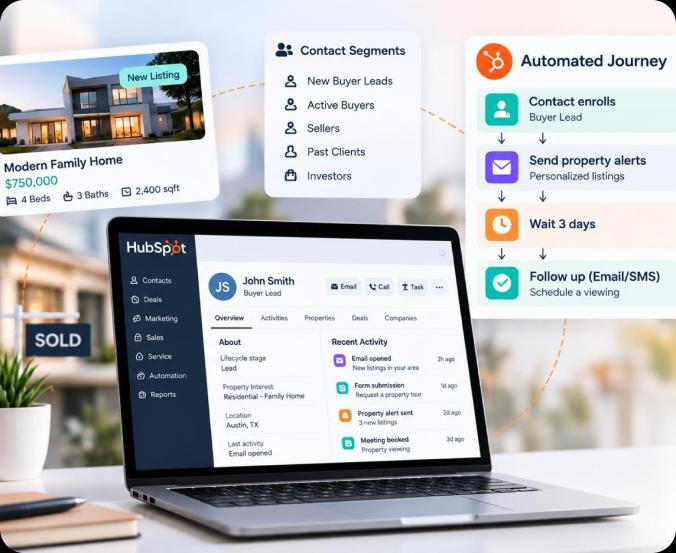
Managing communication manually becomes harder as your database grows.
Different contacts need different messages. A new buyer lead may need property information, while an active buyer may want updates about new listings. A seller may need market information, while a past client may be ready for another transaction.
Real estate marketing automation can help teams automate repetitive communication while keeping outreach relevant to each contact's stage and interests.
This allows teams to automate routine processes without removing the human conversations that are important in real estate.
Buyer or seller submits an inquiry through website, form, or campaign.
Prospect contact information is automatically added to HubSpot for tracking.
Prospect's preferred property type, location, or requirements are identified.
Inquiry is routed to the appropriate real estate agent or team.
Automated follow-up starts based on property interest and inquiry details.
Prospect engagement across emails, forms, and campaigns is tracked automatically.
Assigned agent receives relevant information and can take next steps.
Property viewings involve buyers, sellers, agents, properties, dates, times, reminders, and follow-up activities.
When these details are managed across calendars, spreadsheets, emails, and separate systems, coordination becomes difficult and follow-ups can be missed.

By connecting viewing activity with CRM records, teams can better understand buyer engagement and determine what action should happen next.
Real estate businesses often rely on multiple platforms to manage listings, websites, lead generation, marketing, communication, documents, transactions, and reporting.
When these systems operate separately, teams may need to move information manually between platforms.
Connecting HubSpot with your existing technology can help reduce repetitive data entry and create a more connected view of clients, properties, and sales activity.


Having data in a CRM is only useful when teams can turn it into actionable information. Real estate businesses need visibility into lead sources, client and property interest, agent activity, viewings, offers, transactions, marketing performance, and pipeline movement. With the right reporting structure, real estate CRM software can bring these insights together, helping teams understand where leads are coming from, which properties are generating interest, how opportunities are progressing, and where follow-ups may be needed. This gives sales, marketing, and management teams a clearer view of the client and sales journey.
Bring lead generation, property management, sales, marketing, communication, and client relationships into a more connected system with HubSpot for Real Estate.

Keep buyers, sellers, agents, properties, listings, deals, and related information organized within a connected CRM environment.
Use a real estate CRM to capture inquiries, organize prospects, track engagement, and manage follow-ups.
Automate routine emails, reminders, notifications, tasks, and follow-ups based on lead, property, or deal activity.
Give agents, sales teams, marketing teams, and managers access to shared information and connected processes.
Connect property information with listings, prospects, viewings, offers, and other relevant activities.
Build real estate CRM software around your current requirements while creating a foundation that can support new properties, agents, markets, workflows, and integrations as your business grows.
Real estate businesses need a CRM that reflects the relationship between people, properties, listings, opportunities, and transactions.
A standard CRM setup may not account for these relationships or the workflows that connect them.
WebGuruz helps real estate businesses plan and implement real estate CRM solutions around these requirements, from CRM architecture and automation to integrations, migration, and ongoing optimization.

Our approach focuses on building a CRM that supports how your agents, brokers, marketing teams, sales teams, and other stakeholders actually work.
Every real estate business has different teams, property types, sales processes, systems, and data requirements. We design your HubSpot real estate CRM around these requirements instead of applying a one-size-fits-all setup.

We review your lead generation, property management, sales, marketing, viewing, transaction, communication, and reporting processes.
We define the required objects, properties, associations, pipelines, workflows, lifecycle stages, and user access based on how your real estate business operates.
We identify the systems that need to exchange information with HubSpot and plan integrations around your existing technology stack.
We create workflows for lead routing, follow-ups, viewing reminders, property updates, communication, notifications, and other repetitive processes.
We test data, workflows, integrations, permissions, and key processes before launch to identify gaps and ensure the system works as intended.
After implementation, we support your teams, review system performance, and make improvements as your property portfolio and business processes evolve.

From lead generation and property management to sales, marketing, and client engagement, create a connected CRM that helps your teams manage every stage of the real estate journey more effectively.
Book an Appointment

A move to HubSpot rarely fails on launch day. The import report says “complete,” the contacts are there, and the deals sit in the pipeline.
Read More →
Your business uses HubSpot to manage customer relationships, but disconnected systems create data issues.
Read More →
Building a website takes more than picking colors, dropping in images, and writing copy.
Read More →