
 +1 (213) 715-5368
Vedanshi
2026-10-23
7 min read
Custom HubSpot Integrations: Benefits, Examples, and Best Practices
Your business uses HubSpot to manage customer relationships, but disconnected systems create data issues.
Read More
Published On:2026-01-30
Creating consistent, engaging social media content can feel overwhelming when you’re juggling multiple platforms and trying to track performance, especially as your business grows and content demands increase. HubSpot’s social media tools bring everything together in one place, making it easier to plan, create, publish, and analyze your content in a way that supports long-term scalability without jumping between different apps.
Whether you’re just getting started or preparing your marketing for future expansion, this guide will walk you through the process step-by-step.
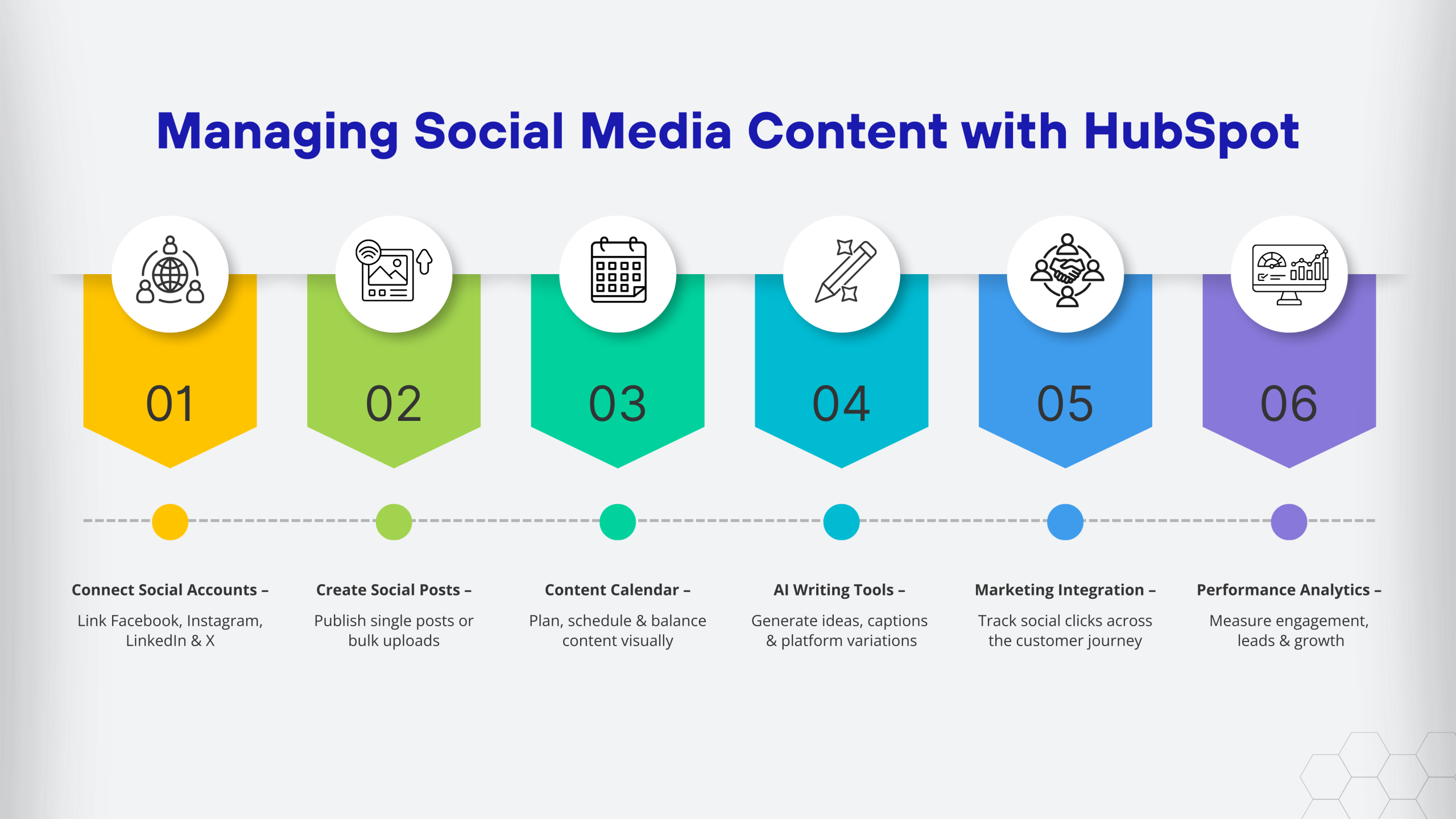
Unlike standalone social media schedulers, HubSpot connects your social efforts directly to your CRM, marketing automation, and analytics. This connection allows businesses to build social media strategies that support future growth by showing how social media impacts actual business results, not just engagement metrics.
Many businesses work with HubSpot Consulting Services to set up their social media workflows properly from the start. Building a scalable foundation early helps teams avoid inefficiencies and supports growth over time.
The first step is connecting your social media accounts to HubSpot to support centralized management as your content volume increases. The platform supports Facebook, Instagram, LinkedIn, and Twitter, which cover most B2B and B2C marketing needs.
Here’s how to connect your accounts:
If you run into technical issues during setup, a certified HubSpot developer can help troubleshoot connection problems or set up custom integrations that support future scalability.
HubSpot gives you two main ways to create social content that scales with your marketing efforts: individual posts and bulk uploads.
Creating an individual post:
The preview feature ensures your content is optimized across platforms as your social presence grows. What looks good on LinkedIn might need tweaking for Instagram, and HubSpot lets you customize the message for each network.
Using the bulk upload option:
If you’re planning content for future campaigns, the bulk upload feature saves time and supports consistent publishing at scale. Many businesses that go through HubSpot Onboarding learn this feature early because it streamlines long-term content planning.
The social media calendar in HubSpot helps teams visualize and manage content in a way that supports future growth. Instead of reacting to last-minute needs, everything lives in one organized, scalable view.
Tips for using the calendar effectively:
You can also create publishing schedules that automatically post at your best-performing times. If you’re working with HubSpot Services, they can help you build scalable content templates and workflows aligned with long-term business goals.
HubSpot’s AI writing assistance helps teams create social media copy faster as content needs expand. It supports scalability by reducing manual effort without replacing creativity.
The AI can help you:
You still need to review and adjust the AI-generated content to match your brand voice, but it’s a helpful starting point when you’re stuck.
This is where HubSpot really shines. Your social posts aren’t isolated; they’re part of your broader marketing strategy.
When someone clicks a link in your social post, HubSpot tracks that interaction in their contact record. You can see their entire journey: they clicked your LinkedIn post, visited your website, downloaded a guide, and later became a customer.
A HubSpot App Developer can create custom integrations if you need your social data to flow into other systems or want specialized reporting.
Creating content is only half the battle. You need to know what’s working.
HubSpot’s analytics show you:
The reports are visual and easy to understand. You can quickly spot trends like which platform performs better or what posting times work best.
For businesses that want deeper analysis, HubSpot Consulting Services can set up custom reports that track exactly what matters to your business.
Each social network has a different audience. Use HubSpot’s customization features to tailor messages for each platform.
If you’re not checking what performs well, you’re guessing. Spend 30 minutes each month reviewing your reports.
Last-minute posts usually show it. Use the calendar and scheduling features to stay consistent.
Social media is two-way. Set aside time daily to respond to comments and messages.
If your team is new to HubSpot, the HubSpot Onboarding process typically covers these best practices.
As your business grows, HubSpot’s learning curve becomes an investment. Start with one network, build repeatable workflows, and expand gradually. Creating templates for recurring content types helps support future scalability.
For advanced needs like custom reporting or integrations, working with a certified HubSpot developer ensures your setup supports long-term growth from the beginning.
Not easily in a single portal. HubSpot is designed for managing one company’s accounts. Agencies typically use separate portals for each client or HubSpot’s agency partner tools.
Currently, HubSpot supports posting to the Instagram feed but not Stories or Reels directly. You’ll need to use Instagram’s native app for those formats.
You can schedule posts as far in advance as you want. Many businesses plan content 30-90 days ahead for evergreen content or major campaigns.
Yes. HubSpot has extensive documentation and support. You can also work with HubSpot Services for personalized help or hire a HubSpot App Developer if you need custom functionality.
Absolutely. Once you schedule a post, HubSpot publishes it at the specified time regardless of whether you’re logged in.
Vedanshi
2026-10-23
7 min read
Your business uses HubSpot to manage customer relationships, but disconnected systems create data issues.
Read More
Vedanshi
2026-10-22
7 min read
Ask ChatGPT, Gemini, or Perplexity to recommend a supplier or a software tool, and you get a short list of names, not ten blue links.
Read More
Vedanshi
2026-10-21
7 min read
Building a website takes more than picking colors, dropping in images, and writing copy.
Read More